About NDLP
Find out how the NDLP equips every secondary student with a personal learning device to build digital skills and support learning in and beyond the classroom.
National Digital Literacy Programme (NDLP)
PLD Infographic (opens in new tab)
DMA After-School Parent Options (For parents who have not exercised their DMA).pdf (opens in new tab)
DMA After-School Parent Options (For parents who have exercised their DMA (opens in new tab)
MOE launched the National Digital Literacy Programme (NDLP) for our schools and Institutes of Higher Learning to help students strengthen their digital literacy. One of the components of the NDLP is the introduction of the Personalised Digital Learning Programme (PDLP) for all secondary school students, whereby every secondary school student will own a school-prescribed Personal Learning Device (PLD) by end-2021.
Students from PDLP Pilot schools sharing their experiences learning with a personal learning device.

Personalised Digital Learning Programme (PDLP) in BMSS
Objectives
With 1 to 1 tech-enabled learning, to create a student-centric, engaging and stimulating teaching and learning environment which encourages Merahans to:
• take ownership of their learning,
• participate in collaborative learning and
• extend their learning beyond the classroom.
School-Prescribed Personal Learning Device (PLD)
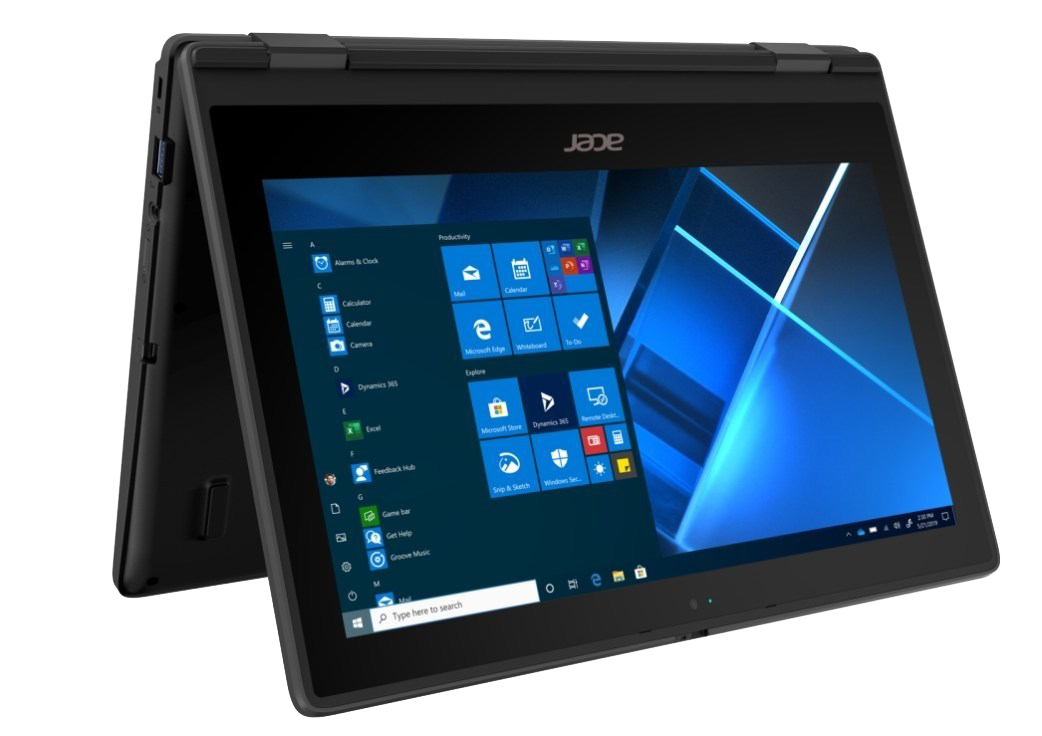
Every new Merahan in 2026 onwards will be using the Acer TravelMate Spin B3 as their personal learning device which comes with a 4 year warranty.
Acer TravelMate is a portable device that offers students convenient learning on-the-move, it also allows for a seamless learning experience alongside existing learning technologies such as the Student Learning Space (SLS), Google Suite and Microsoft Office. The touch screen and inking function makes it the device of choice in developing students’ application and creative skills.
PLD Specs
Device Category | Acer TravelMate B3 Spin TMB312RN-31 (N250) (Enhanced) |
Processor | Intel® Processor N250 |
RAM | 8GB RAM |
Storage | 128GB SSD |
Display | 11.6″ |
Weight | 1.49kg |
Processor Base Frequency | 1.10 Ghz |
CPU Cache | 4 MB L2 cache |
Screen Panel Type | HD Multi-Touch LCD panel |
Number of Core | 4 |
Graphics Coprocessor | Intel® UHD Graphics 605 |
Ports | USB Type-CTM port, supporting: USB |
Connectivity | Integrated WLAN 802.11ac + Bluetooth v5.0 |
Webcam | 720p HD |
HDD | 128GB eMMC |
Battery | 48 Wh 3-cell Li-ion battery |
OS | Windows 11 (Education) |
Other features/ offers | HD Audio, MicroSD Card Slot |
Accessories | Power Adaptor, Mouse, Carrier Bag, Active Stylus Pen (Docked-in) |
Warranty | 4 years warranty inclusive of 1 time accessories replacement |
Financial Assistance
To ensure the affordability of devices, MOE provided a $500 Edusave top-up for students aged 13-16 years old. This is on top of the annual Edusave contribution of $290 for secondary school students and $230 for primary school students
This is on top of the annual Edusave contribution of $290 for secondary school students and $230 for primary school students.
For students who need additional support, proceed to the General Office for a hard copy form.
Application is open to all students whose Gross Household Income (GHI) ≤ $4,000 or Per Capita Income (PCI) ≤ $1,000. PCI is GHI divided by the number of household members. Students on MOE Financial Assistance Scheme or School-Based Financial Assistance Scheme do not need to apply for this as they will automatically be granted the subsidy by the school.
ICT Applications as part of National Digital Literacy Programme
Overview
As part of the NDLP, schools will progressively roll out ICT applications that will be vital to students’ learning experience and educational journey.
The school will need to use your child/ward’s personal data such as his/her name and class to set up user accounts.
Please refer to our Frequently Asked Questions section for more information on the collection of data via these applications.
ICT Applications
In the following months, MOE will roll out some or all of the following applications:
Student ICON - MOE will give every secondary school student an email address. This is a service provided by Google as part of Google Suite.
Microsoft 365 Pro Plus - Every Secondary School will be granted a license to use Microsoft Office tools that include Word, PowerPoint and Excel.
Device Management Application (DMA)
Overview
Please note that when you purchase a PLD, the PLD will be pre-installed with a Device Management Application (DMA). The DMA has a variety of functions that will support the use of the PLD in the classroom, as well as safeguard students’ cyber-wellness. The DMA can:
• Remotely deploy teaching and learning applications as well as security patches
• Enable teachers to monitor and control the students’ screens
• Restrict apps and websites accessible
• Limit screen time
Classroom Management
Teachers are able to actively monitor and control the student’s use of the PLD during lesson time to help student better manage distractions and deliver effective teaching.
Mobile Device Management
Remote deployment of teaching and learning applications as well as security patches is made possible with DMA. Schools may also leverage on the Mobile Device Management Service to install the school’s teaching and learning resources.
Usage Management
This addresses stress to the student’s eyes from prolonged use and cyber wellness concerns, such as excessive and inappropriate use of the PLD.
Updating Choice of After-School DMA Option
If you would like to change your DMA settings option, please email our school DMA administrator for assistance. Kindly note that changes to your DMA option will take at least 2 working day.
DMA Administrator: Mr Haikal
Email: muhammad_haikal_razali@schools.gov.sg
Frequently Asked Questions (FAQ)
How will my child/ward's data be used in DMA?
The Device Management Application (DMA) which will be installed in your child/ward’s PLD collects data on usage by the student, such as the amount of time spent on each application. The DMA data will only be used for MOE’s cyber-wellness measures and technical troubleshooting. MOE will not disclose the data to any person otherwise than permitted under the law.
Where will the data collected by DMA and IT Applications for NDLP be stored?
All user data which is collected by MOE will be stored in secure servers managed by the respective vendors of our systems. The Government has put in place strong personal data protection laws and policies to safeguard sensitive data collected by public agencies such as MOE. Please refer to this website for more information on these laws and policies:
https://www.mddi.gov.sg/other-pages/personal-data-protection-laws-and-policies (opens in new tab)
How will my child/ward's data be used in the ICT Applications?
For the ICT Applications (student iCON, Microsoft ProPlus), the school will use your child/ward’s personal data such as his/her name, birth certificate number and class to set up user accounts. This data will also be used for the purposes of authenticating and verifying user identity, troubleshooting and facilitating system improvements. In addition, the commercial providers of these platforms (e.g. Google, Microsoft) will collect and deal with user data generated by your child/ward’s use of these applications. The collection use and disclosure of such data are governed by the commercial provider’s terms of use, which can be found here:
• Student iCON: https://workspace.google.com/terms/education_terms/ (opens in new tab)
• Microsoft Pro Plus: https://portal.office.com/commerce/mosa.aspx (opens in new tab)
What is the PLD warranty?
PLD devices bought in 2026 onwards will be given 4 years warranty. PLD devices bought in 2025 and before will be given 3 years warranty.
Parent Handbook
Refer to Parent Handbooks:
Parent Handbook I (opens in new tab)
Parent Handbook II (opens in new tab)
Acceptable Use Policy
Refer to Acceptable Use Policy here (opens in new tab)
Parent Briefing Slides / Q&A Response
Personal Learning Device (PLD) Briefing for Parents (opens in new tab)
Student Device Information Kit_16 Mar 22 (opens in new tab)